This report allows you to calculate how many roundtrips were made during a certain period, with their total mileage and time.
In the detailed version of the report, you can see the exact data for each trip, back and forth.
Configuration

To generate the report, you must configure the following inputs:
| Configuration | Description |
| Period |
The period the report will be generated for. Options:
|
| Show information by |
Here you must choose the the source of the information. It can be:
Once you select one source, you must select which components will be used to filter the report. For instance, if I want my report to be generated for some vehicles of my fleet, I first select Vehicles and then choose their License plates in the next selector:
|
| Show report | If you select Detailed (Default), you will see an additional table at the beginning of the report with - |
| Place A-B | For the trips to be considered in this report, they must be made between the Places selected here. |
| Ignition must be disconnected in Places | If you select this option, only trips which the vehicle's ignition was disconnected (inside the Places selected above) will be considered for the report. |
| Vehicle must stay in Place at least (minutes) | The time the vehicles must stay in Place (both A and B) for the trip to be considered in the report. |

Output
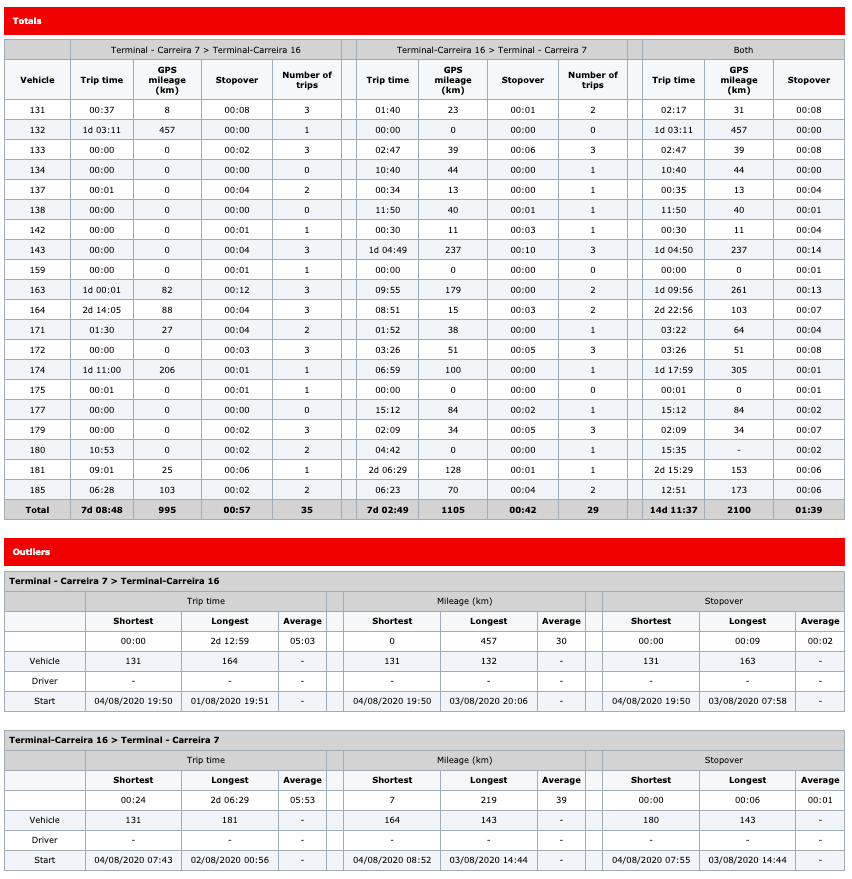
Totals - This table is divided in four contents:
-
The vehicle
-
Data regarding trips from Place A to Place B
-
Data regarding trips from Place B to Place A
-
Aggregated data about both trips
It contains the following columns:
| Column | Description |
| Vehicle | Vehicle that executed the trips. |
| Trip time | Sum of the duration of the trips. |
| GPS mileage | Mileage driven during the trips |
| Stopover |
Shows the total time that the vehicle was stopped in the trip’s destination place. |
| Number of trips |
Shows the total number of trips made from Place A to Place B or Place B to Place A. |
Outliers - These two tables presents some resumed statistics of each path, Place A to Place B and Place B to Place A.
Both tables are divided in three parts: Trip time, Mileage and Stopover. Each of these parts present the shortest time, the longest time and the average time of the trips.

Trips - Shows the detail of each trip between the two selected places, according to the rest of the parameters.
This grid is available only when the option Show report is set to Detailed in the configuration.
| Column | Description |
| Vehicle | The vehicle that executed the trip. |
| Driver | Driver that executed the trip. |
| Start | Trip's start date and time. |
| End | Trip's end date and time. |
| Trip time | The duration of the trip. |
| GPS mileage | Mileage driven during the trip. |
| Stopover | Time the vehicle stoped over places A and B. |