The Coupling/Uncoupling report list all the operations of coupling and uncoupling of the selected vehicles, in the selected period.
Each line of the report represents a vehicle and an asset, and shows where and when this operation started and ended.
Configuration
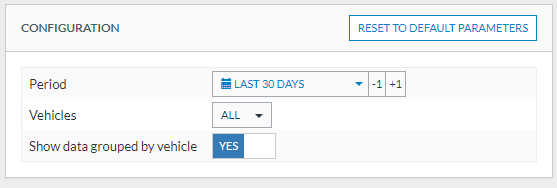
To generate a Coupling/Uncoupling report you must configure the following inputs:
| Configuration | Description |
| Period |
The period the report will be generated for. Options:
|
| Vehicles | Choose here the vehicles that will be watched for the report. |
| Show data grouped by vehicle | If you choose Yes, the report will group the operations by vehicle - one vehicle per block. (Default: No) |
Output

The output of the report contains the following information:
| Column | Description |
| Vehicle | The license place of the vehicle |
| Couple with | The license plate of the asset coupled with this vehicle |
| Couple on | Date and time of the coupling event |
| Place | Place where the coupling event occurred (if available) |
| Address | Address where the coupling event occurred |
| Uncoupled on | Date and time of the uncoupling event |
| Place | Place where the uncoupling event occurred (if available) |
| Address | Address where the uncoupling event occurred |
If you select the option Show data grouped by vehicle, the layout of the output changes. The column Vehicle is hidden, and a header with the vehicle is displayed above the table with the events of this vehicle:
