This is the Home section. It contains a summary of your activities:
You may configure the Gadgets you wish to see on this screen. To do so, you must access the Settings menu.
The gadgets currently available are the following:
Last trip: shows you the information regarding your last trip. You can click on it to move to the Trips section:
Recent Driving behavior: contains your Driving behavior summary for the last 30 days. You can also click on it to move into the Driving behavior section of the app:
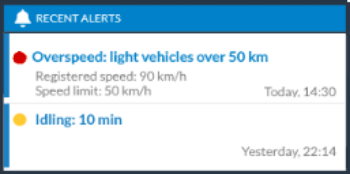
Recent alerts: displays the latest unread Alerts triggered for the driver (up to two):